
ShopBack continues to be one of the easiest ways to earn cashback while shopping online. You can now earn cashback not only from traditional shopping but also from games and other activities in the ShopBack app. Cashback rates, cashback crediting times, and merchant participation still vary per store
What is Shopback?
Shopback is a cashback reward program that allows users to receive a percentage of their online purchases.

How does Shopback provide rewards?
Shopback earns from affiliate commissions when they direct users to the online platforms. In return, the users get a small percentage of the commissions that Shopback earns through their cash-back rewards. So it’s a win-win scenario.
So how does it work?
Instead of going directly to the app where you will make your online purchase, you need to open the Shopback app first and locate and open the online platform app where you intend to purchase an item. That way, the online platform will register the link where the user came from (in this case Shopback) and Shopback can track the purchase you’re going to make.
Who are the affiliate partners?
There are a lot of them. Here are some merchant partners:

How do I create an account?
You can simply download the app on your device by going to this Shopback link or by downloading it directly from Google Playstore or Apple Appstore.
If asked for a referral code, put: j9wAMW
Note: using my referral code will earn you Php 100 cashback after spending Php 300 on any of the affiliate shops.
You will need to verify your account via an OTP code that will be sent via SMS.
How much cashback can I earn?
That depends on the online platform and the product/service that you will buy/avail. Sometimes you may just get cents to a peso but there are cases where you can earn more.
Here are examples of possible cashback you can get when you go through Shopback when purchasing from Shopee:
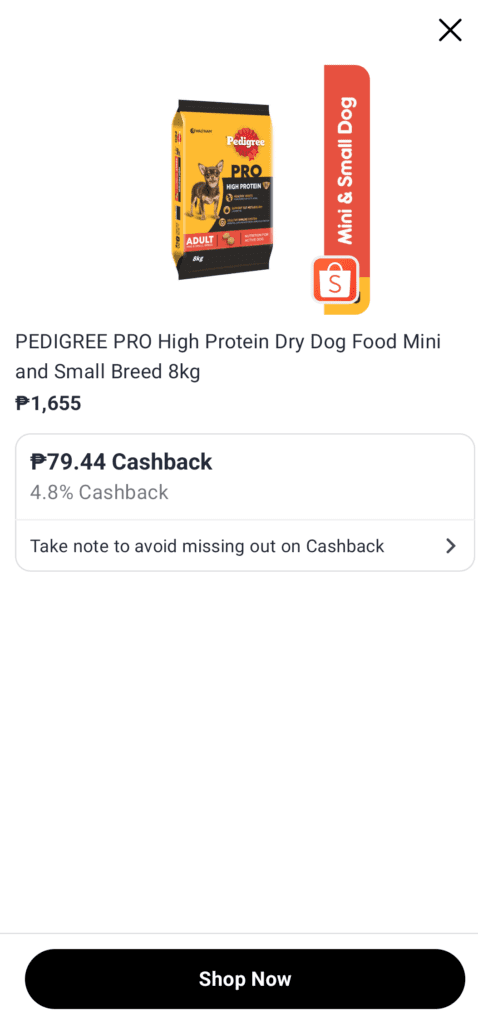
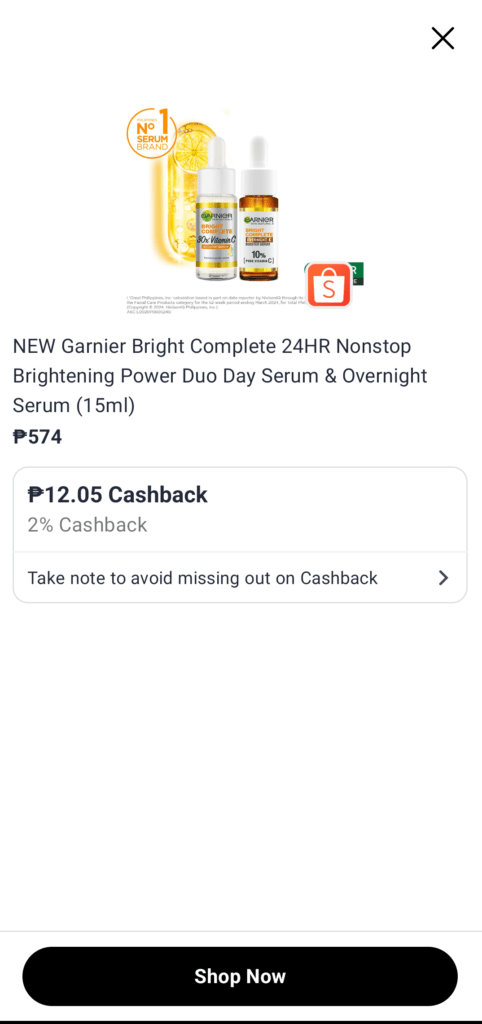
When do I get credit for my cashback?
After purchase, your cashback will usually show as Pending first. This status means the partner store has tracked your purchase, but the cashback hasn’t been confirmed yet. Depending on the store, it may take several days to a few months (e.g., travel bookings and some larger merchants take longer) before the status changes to Confirmed and then becomes withdrawable. You can check your pending and confirmed cashback under Lifetime earnings → Cashback activity in the ShopBack app or website.

Take note that not all tracked transactions will get confirmed. Some of them can get rejected. The reasons for rejection are the following:
- You canceled/refunded the purchase you made
- You didn’t actually proceed with the purchase but the transaction was tracked for some reason
- You haven’t paid for the purchase/service before the confirmation date – this could happen with bookings with Agoda (and other travel merchants) if you use their “Book now Pay later” option.

How do I withdraw the cashback I earned?
ShopBack lets you withdraw once you have at least ₱200 in confirmed cashback, and you can cash out to banks, GCash, PayPal or supported payment methods depending on availability in your country.
Tips to Maximize Your Cashback on ShopBack
If you want to make sure your cashback gets tracked properly (and you don’t miss out on earnings), here are some important tips:
1. Always Start From the ShopBack App or Website
Before buying anything, open the ShopBack app or go to their website and click the store from there. Do not open Shopee, Lazada, or other stores directly. Cashback only tracks if you enter the store through ShopBack.
2. Complete the Purchase on the Same Device
Once you click through from ShopBack, finish the entire purchase on the same device and browser. Switching devices or apps in the middle of checkout may cause tracking issues.
3. Avoid Using Other Voucher or Cashback Extensions
Using other cashback apps, browser extensions, or voucher codes not listed on ShopBack can cancel your cashback eligibility. If you want to be safe, stick to the promo codes shown inside the ShopBack page itself.
4. Don’t Leave the Checkout Page
After clicking “Shop Now” on ShopBack, avoid opening new tabs or comparing prices in another window. Go straight to checkout and complete your order.
5. Check Your Pending Cashback
Your cashback will usually appear as “Pending” first. This means the purchase was tracked but not yet confirmed. Some stores confirm within 15–30 days, while travel bookings or big purchases can take longer. Once confirmed, that’s the time you can withdraw it (minimum ₱200).